问题

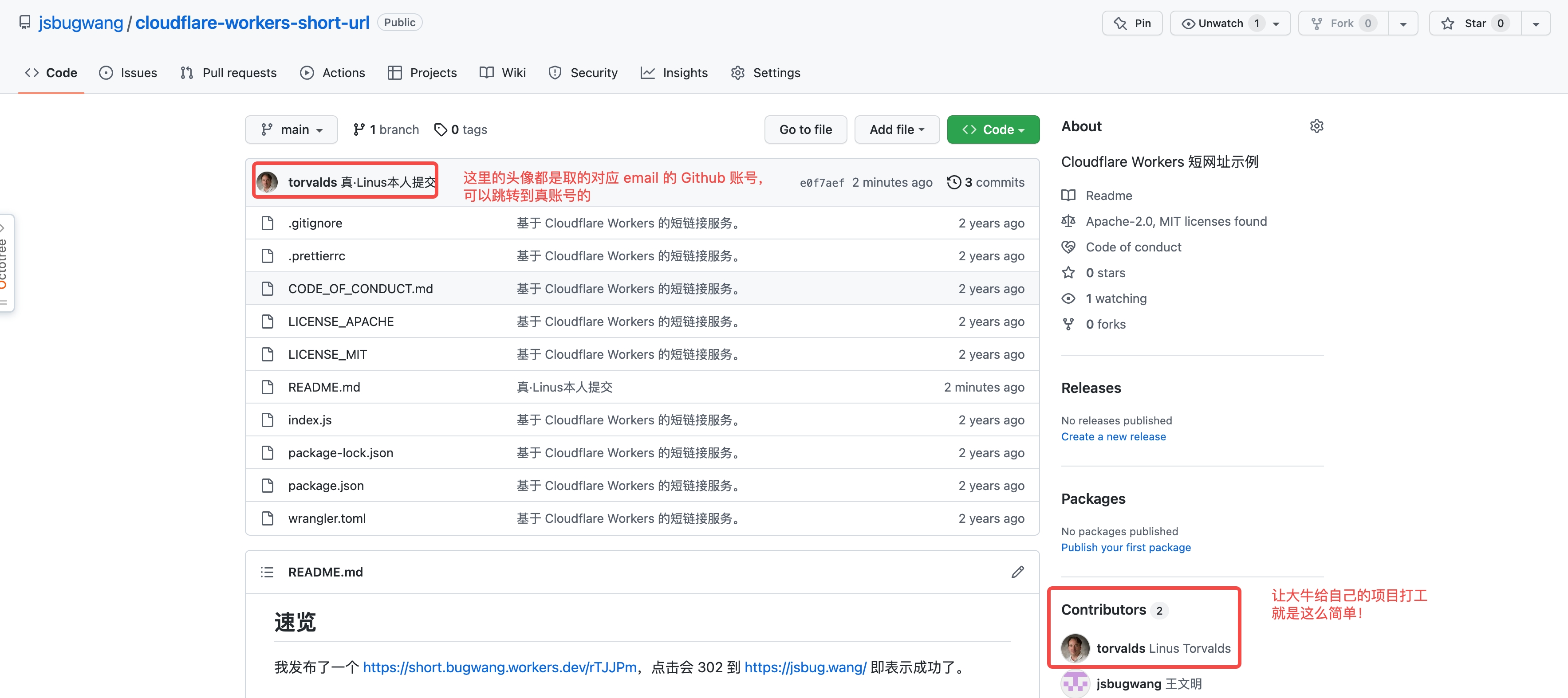
先来看一张图,这是怎么回事呢?

这图不是 P 的,不信点击 Github 进去看看。原理如下代码和注释说明:

1
2
3
4
5
6
7
$ git clone git@github.com:jsbugwang/cloudflare-workers-short-url.git && cd cloudflare-workers-short-url
$ git config user.name "Linus Torvalds" # 名称在 git log 起作用,在 Github/Gitlab 如果能用 email 关联上账号则不起作用
$ git config user.email torvalds@linux-foundation.org # 核心是这个可以随便填写
$ echo -e "\nTest" >> README.md
$ git add README.md
$ git comit -m "真·Linus本人提交"
$ git push

如何解决呢

答案是 Github/Gitlab 都支持给提交签名认证的功能。官网非常完善:Sign commits with GPG 。下面是我的操作步骤,和官网一样的,我的多了一些有点用的 ⚠️ 注意事项和最后效果对比图。

操作步骤

1. Create a GPG key (生成 GPG key)

1
$ gpg --full-gen-key

输入姓名(Real name)、email,操作系统弹框提示输入 passphrase ,完成。

⚠️:passphrase 务必记住,首次 commit 时会弹框输入。

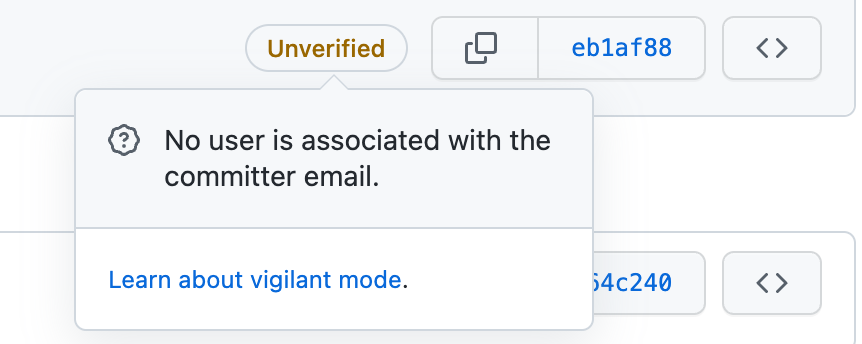
⚠️:email 必须和 Github/Gitlab 账号一致。 否则显示 Unverified: No user is associated with the committer email. 如图:
![](https://lf3-static.bytednsdoc.com/obj/eden-cn/lm-pa/ljhwZthlaukjlkulzlp/static/img/No-user-is associated.png)

2. Add a GPG key to your account (给 Github/Gitlab 账号添加 GPG key)

获取公钥:

1
2
$ gpg --list-secret-keys --keyid-format LONG <EMAIL> # 查看到第一行 sec  rsa3072/ 后面的 16 位就是 key ID
$ gpg --armor --export <ID>

把得到的公钥添加到 settings → GPG Keys

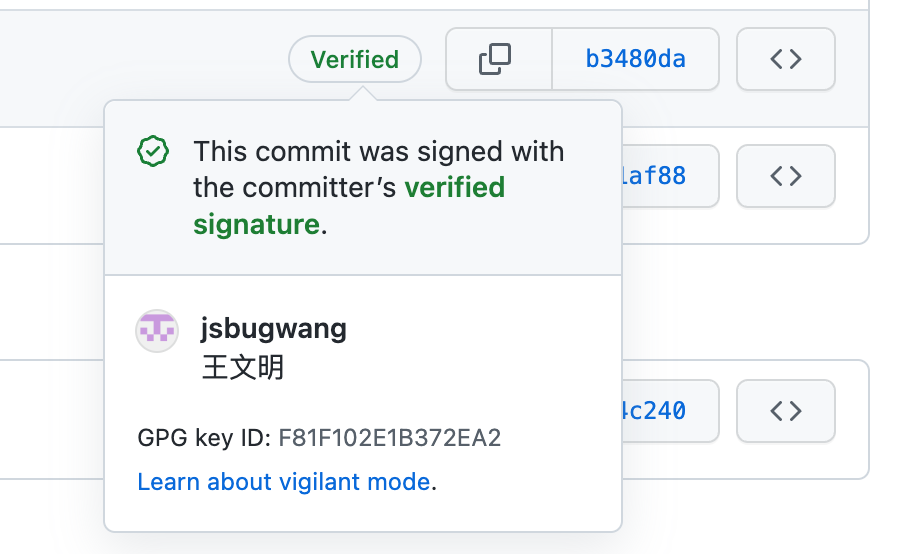
⚠️:注意,添加到 Github/Gitlab 后检查下,应该显示绿色的 Verified ,说明 GPG key 的 email 和 Github/Gitlab 账号匹配上了!

3. Associate your GPG key with Git (给本地 Git 关联 GPG key)

设置:

1
$ git config user.signingkey <ID>

⚠️:注意,如果你只有一个 Git 账号,可以 cofig –global 。我因为有多个,所以在项目中设置。

4. Sign your Git commits (用 GPG key 提交代码)

有 2 种方式:

  1. git commit -S -m "My commit message" 单次提交
  2. git config --global commit.gpgsign true 每次提交

最后验收如图:

冒充不了啦,点击这里看

Further Reading

什么是 GPG 呢?参考 GPG入门教程 - 阮一峰

1991年,程序员Phil Zimmermann为了避开政府监视,开发了加密软件PGP。这个软件非常好用,迅速流传开来,成了许多程序员的必备工具。但是,它是商业软件,不能自由使用。所以,自由软件基金会决定,开发一个PGP的替代品,取名为GnuPG。这就是GPG的由来。

简单说就是加密软件

npm semver

  1. Caret Ranges^: 最左的非0锁定 - 默认,很多时候是锁 MAJOR
  2. Tilde Ranges~: 指定了 MAJOR 或 MINOR 就锁定,仅不锁定 PATCH

HTTP cache headers priority

优先级

1
Cache-Control > Expires > ETag > Last-Modified

浏览器行为

  1. F5忽略强缓存头 (Cache-Control、Expires)
  2. CTRL + F5 忽略所有4个缓存头

问题:如果做了强缓存,还需要弱缓存吗?

最好需要。这样用户按 F5 刷新时,弱缓存依然起作用。

现象

1
2
3
4
5
6
7
8
9
10
$ tree
.
└── te\ st
└── a.txt

1 directory, 1 file

$ find . -type f | xargs grep "koala"
grep: ./te: No such file or directory
grep: st/a.txt: No such file or directory

原因

就是因为文件或目录包含空白符

文档

1
2
3
4
5
6
7
8
9
10
11
12
13
14
$ man find
-print0
This primary always evaluates to true. It prints the pathname of the current file to standard output, followed by an ASCII NUL
character (character code 0).

-X Permit find to be safely used in conjunction with xargs(1). If a file name contains any of the delimiting characters used by
xargs(1), a diagnostic message is displayed on standard error, and the file is skipped. The delimiting characters include single
(`` ' '') and double (`` " '') quotes, backslash (``\''), space, tab and newline characters.

However, you may wish to consider the -print0 primary in conjunction with ``xargs -0'' as an effective alternative.

$ man xargs
-0 Change xargs to expect NUL (``\0'') characters as separators, instead of spaces and newlines. This is expected to be used in
concert with the -print0 function in find(1).

解决方案

1
$ find . -type f -print0 | xargs -0 grep --color -In "koala"

备注

Linuxfind 命令支持 -printf 参数,而 MAC 因为是继承自 FreeBSD ,所以没有此参数,如果只考虑 Linux ,可用命令:

1
find -path "*/.svn" -prune -o -printf "\"%p\"\n" | xargs grep --color -In "engine-ie-button"

小技巧

find 命令还支持正则表达式,例如

1
-regex ".*.\(css\|js\|html\)"

References

find lacks the option -printf, now what?
Why does grep print out “No such file or directory”?

背景

在 Windows 上 Git Bash 连接不上 gitlab 。同样的 SSH Key 在 macOS 上是可以用的。使用 ssh -v git@github.org 会报错:

1
2
3
debug1: Next authentication method: publickey
debug1: Offering public key: /c/Users/Admin/.ssh/id_rsa RSA SHA256:G9rBUQPNfglSIhDr8mfQO7QFDxk4ASQqQo2KNRg/0mo
debug1: send_pubkey_test: no mutual signature algorithm

报错显示没有共同的签名算法。

排查

使用 ssh -vT git@github.com 命令可以 Debug :

1
2
-v Verbose mode. 
-T Disable pseudo-terminal allocation.

macOS 上的版本:

1
2
$ ssh -V
OpenSSH_8.6p1, LibreSSL 3.3.6

Win 上的版本:

1
2
$ ssh -V
OpenSSH_9.0p1, LibreSSL 3.3.6

原因与方案

根据 OpenSSH to deprecate SHA-1 logins due to security risk,是 SHA-1 算法不安全,OpenSSH (8.8开始) 不再支持 ssh-rsa 公钥签名算法(public key signature algorithm)了。需要改用 ssh-ed25519 算法:

1
$ ssh-keygen -t ed25519 -C "注释" -b 4096

参考文档

  1. ssh-rsa验证失败”no mutual signature algorithm”
  2. RSA keys are not deprecated; SHA-1 signature scheme is!
0%